
Description
Make the next stock and supplier review easier to act on.
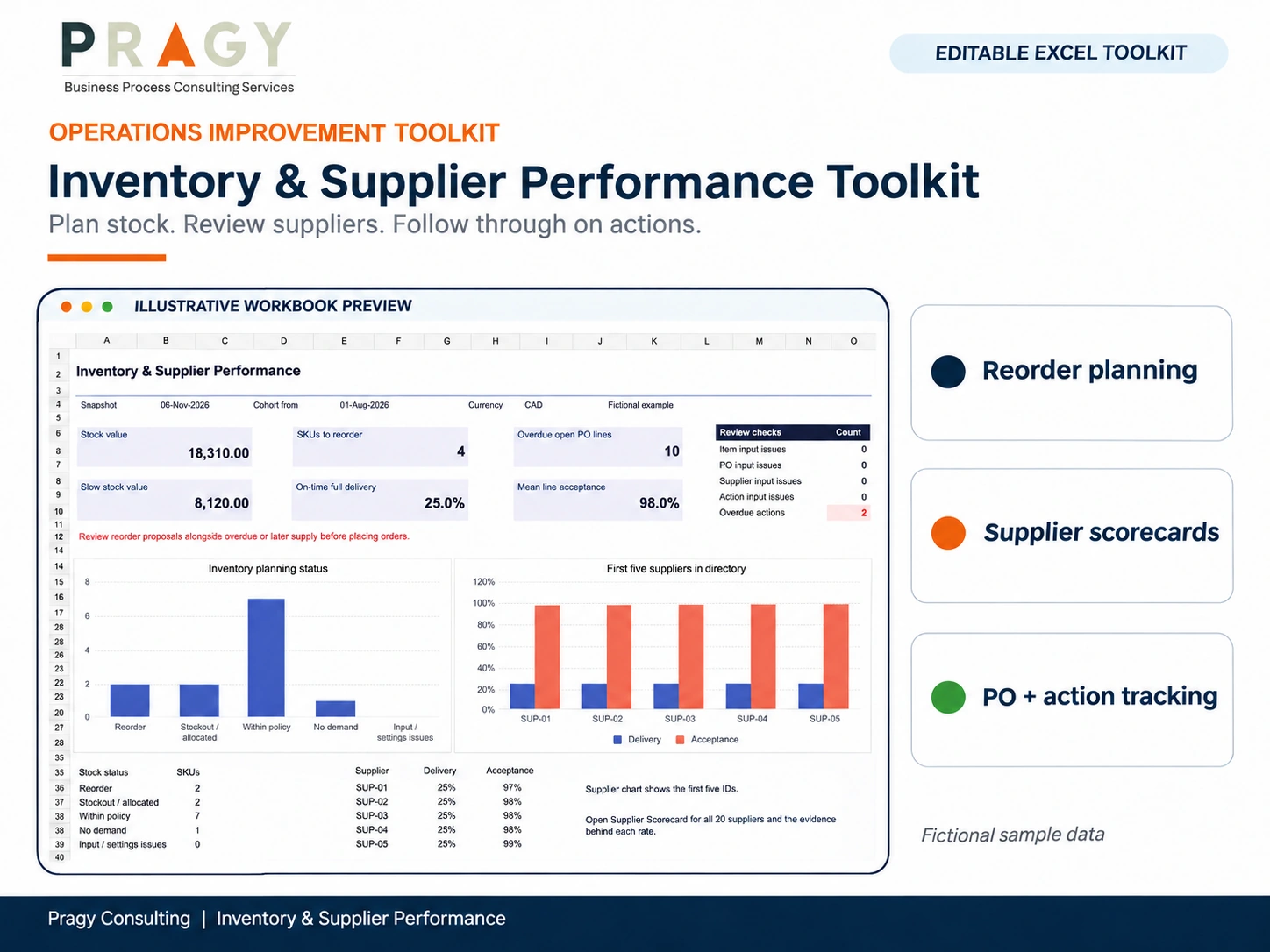
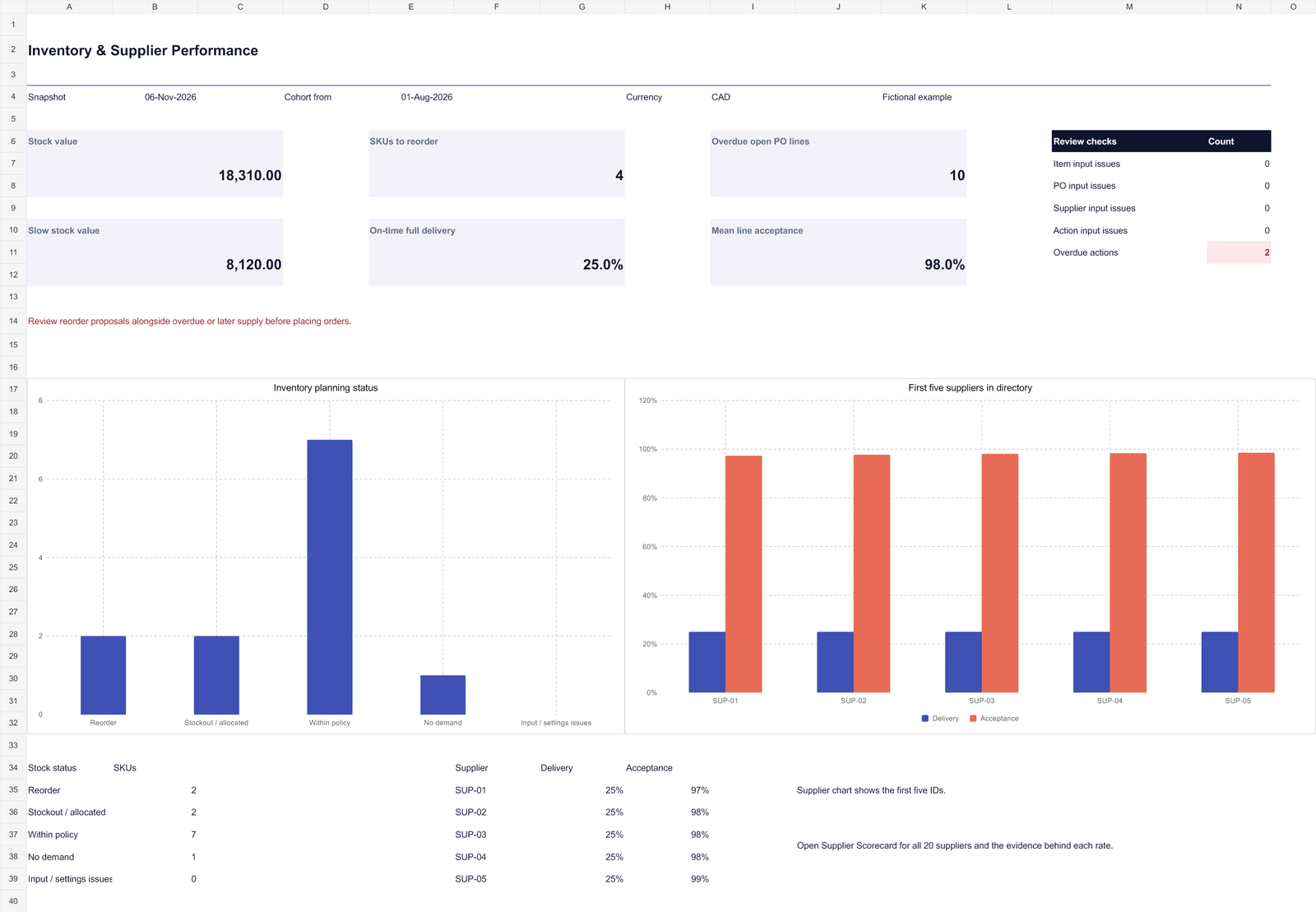
Stock shortages, slow-moving inventory and late purchase orders often appear in separate spreadsheets. The Pragy Inventory & Supplier Performance Toolkit gives a small operations or purchasing team one Excel view of the current stock position, replenishment proposals, supplier results and follow-up actions.
Use it to prepare an informed review: what needs attention, which supply commitments need checking, and who owns the next step. The workbook proposes quantities for review; purchasing approval stays with your team.
Connect stock exposure with supply decisions
See the stock position
Review stock value, physically available quantities, days of cover, excess and slow-moving stock. Missing demand or stock-age evidence stays visible for investigation.
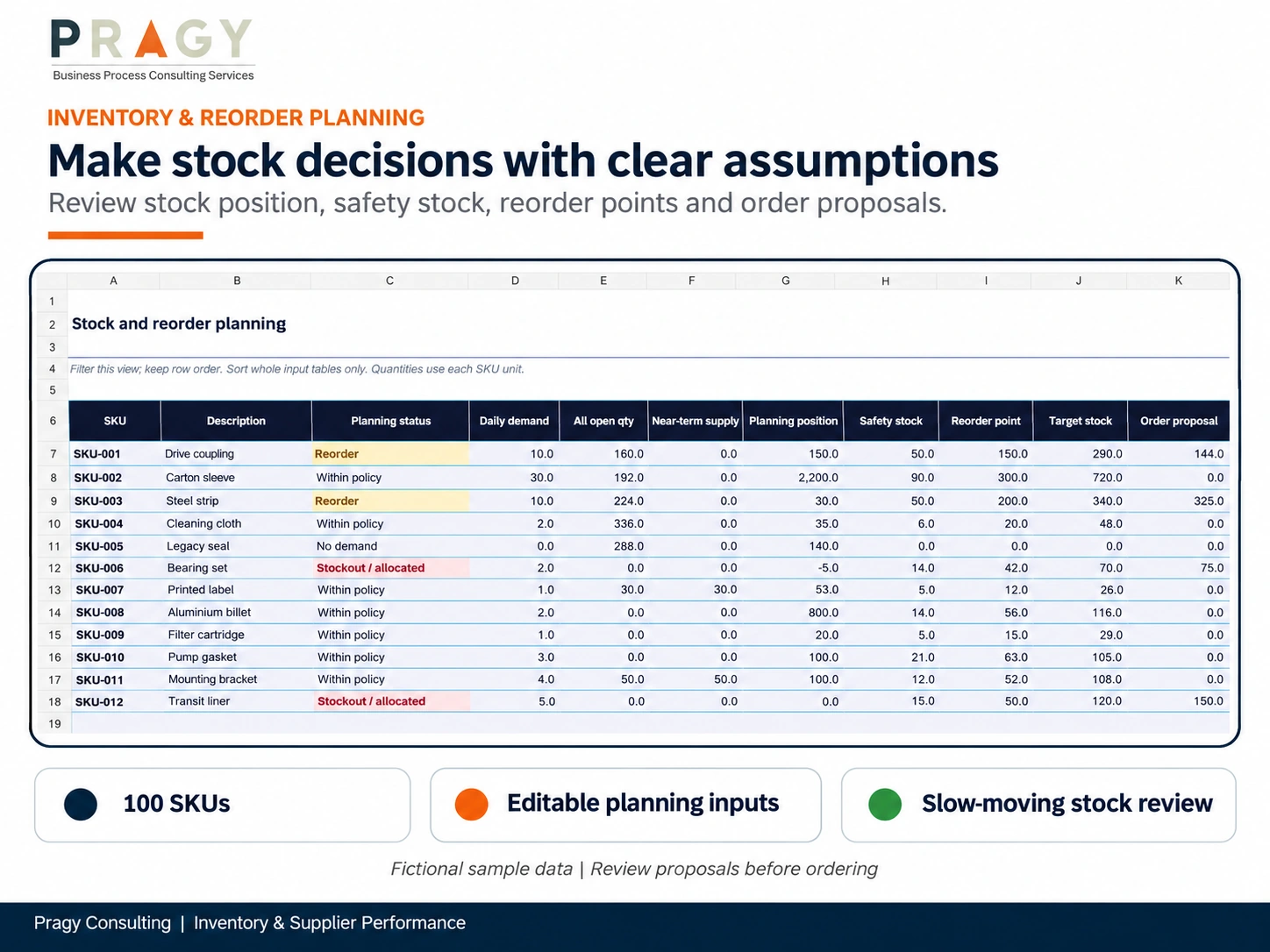
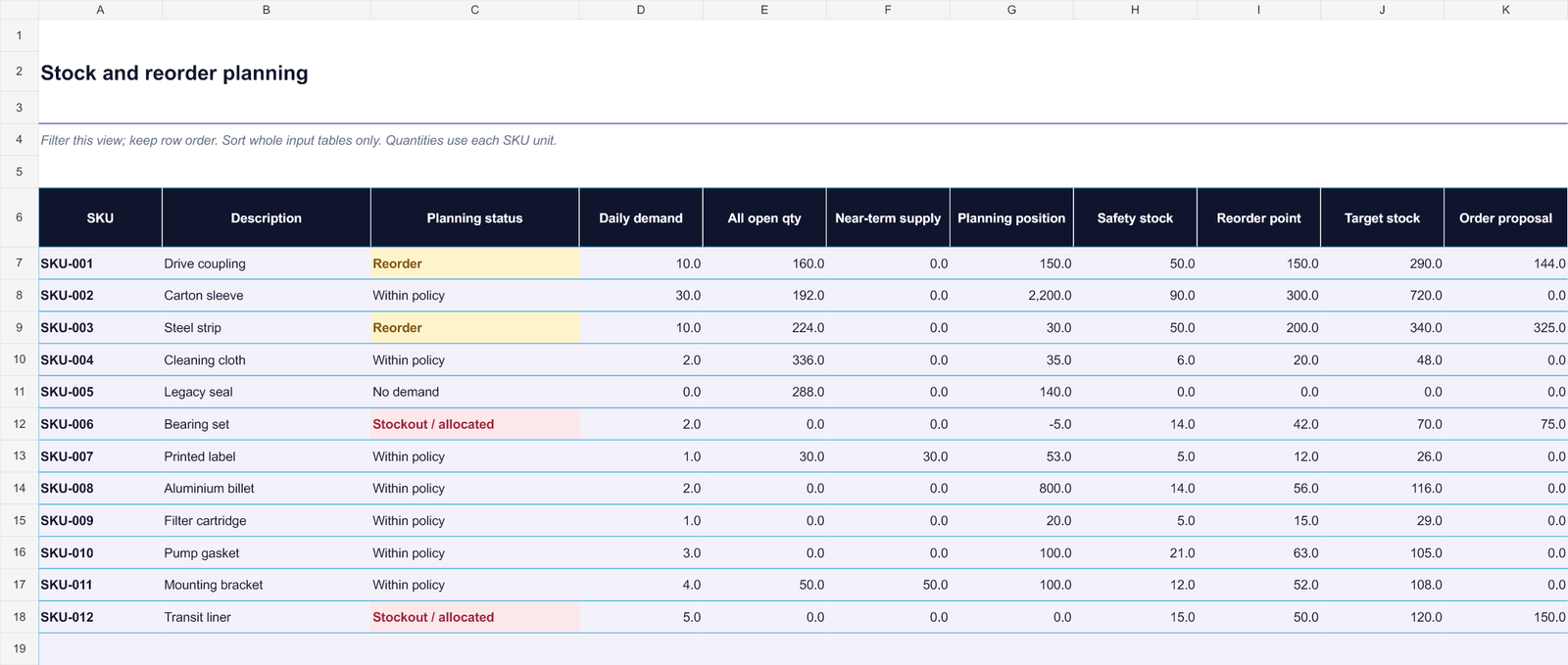
Prepare replenishment proposals
Use demand, calendar-day lead time and chosen safety coverage to calculate reorder points and target stock. Proposals apply minimum order quantities and pack multiples.
Follow supplier performance
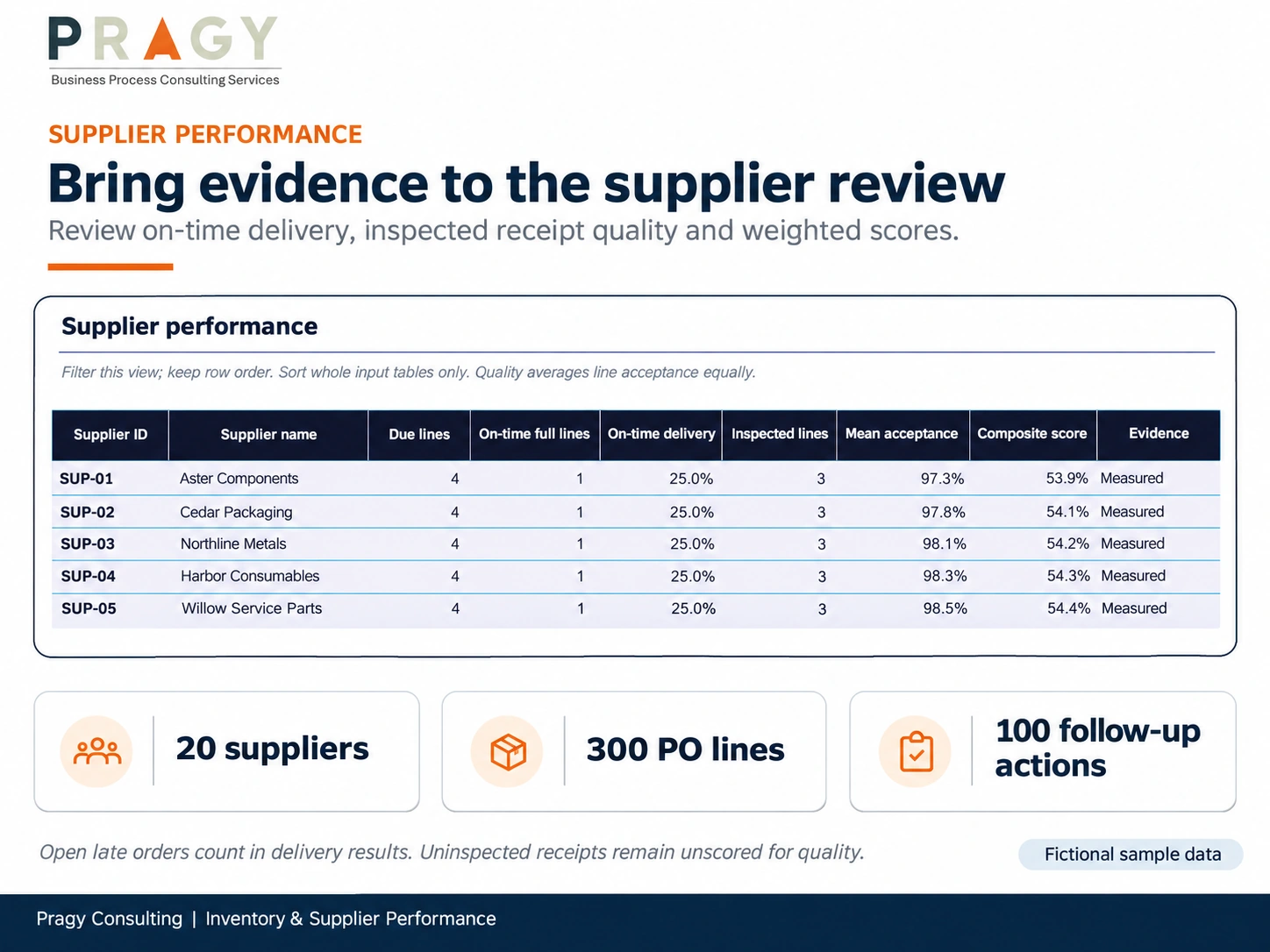
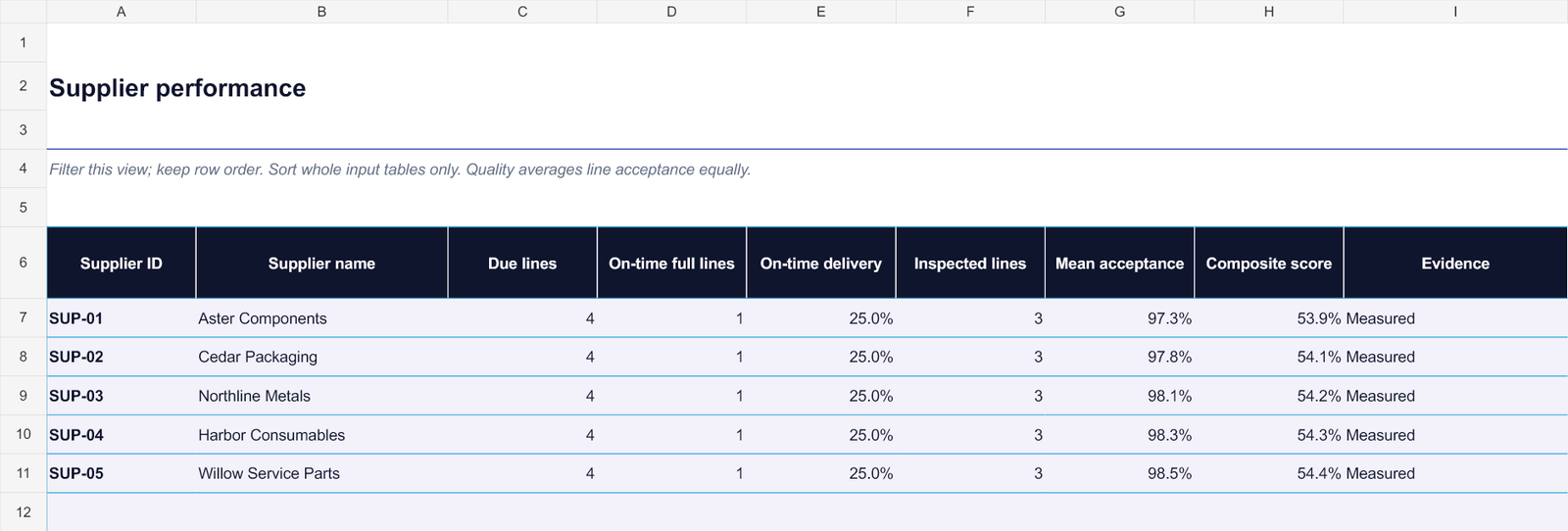
Compare on-time complete delivery and mean line acceptance against your selected targets. Sample counts and missing inspection data help you judge how much evidence supports the score.
Review open supply before placing another order
The Inventory Plan considers the unreceived remainder of valid open purchase-order lines due within each item’s lead-time window. Overdue and later-dated orders remain important commitments to investigate before buying more stock; they are excluded from near-term supply.
Keep one base unit per SKU and one common currency across the workbook. The planning policy uses calendar days and manually chosen safety coverage. It does not calculate a statistical service level or convert currencies.
Keep the original supplier commitment visible
The Supplier Scorecard uses the original promised due dates. Open late lines remain in the delivery denominator, so an unreceived order cannot disappear from the delivery score. Record partial receipts and inspection progress as cumulative quantities on the existing PO line.
Quality performance is the average of each inspected line’s acceptance rate, with equal weight per line. The composite combines delivery and acceptance using your selected weights. Missing quality data leaves the composite unavailable; limited samples are flagged rather than presented as strong evidence.
Leave the review with named actions
Record the SKU or Supplier ID, the issue, an accountable owner, due date and next step. The action register highlights overdue unresolved work. Use the editable Supplier Review and Action Template to capture the discussion and the decisions that need follow-up.
Save a dated workbook copy after each review. This version is a current stock and cumulative-order snapshot: changing the reporting date alone does not reconstruct historical stock, receipts or supplier scores.
What you receive
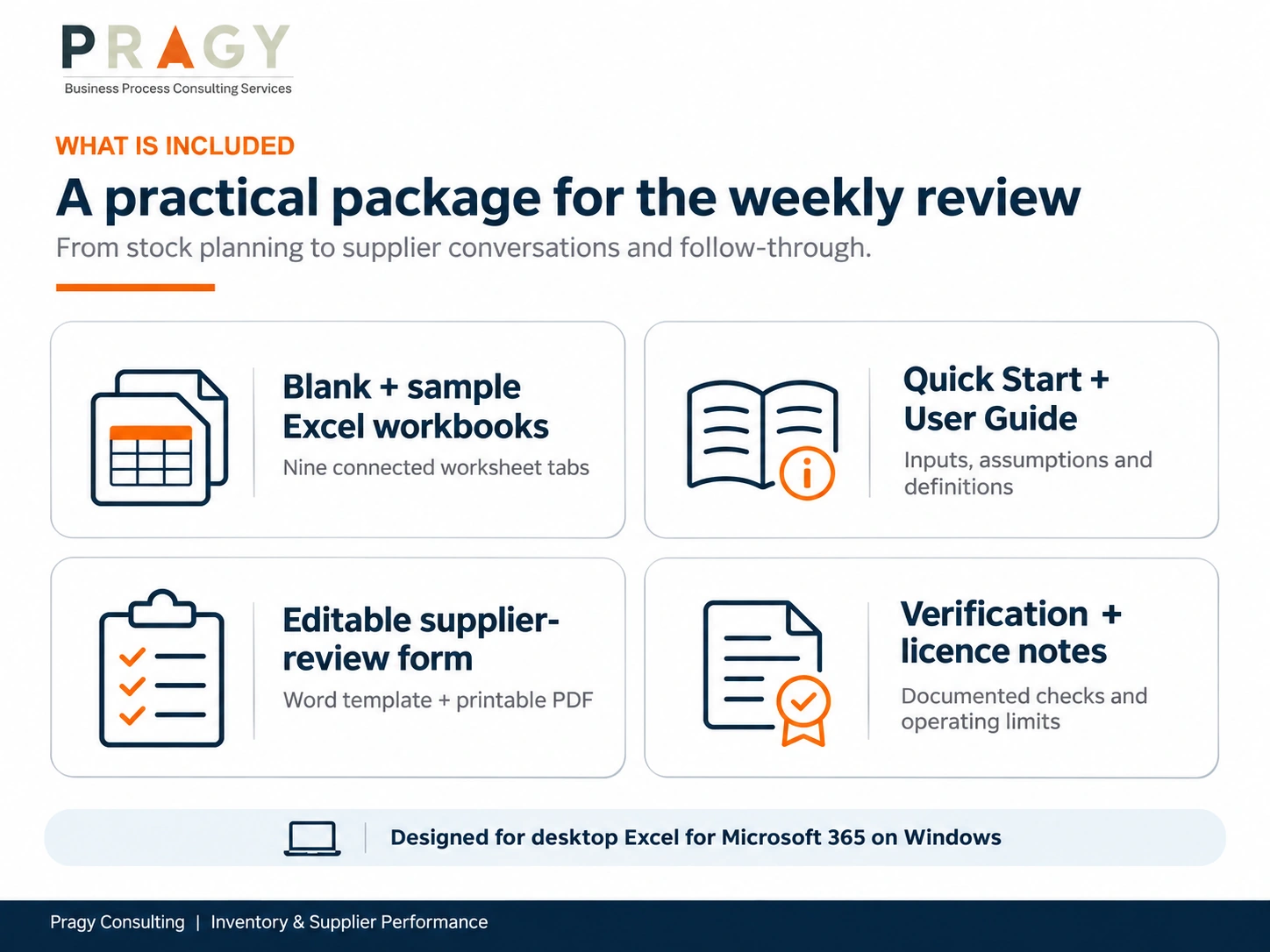
- A populated Sample Excel workbook and a clean Blank workbook.
- Nine connected worksheet areas: Dashboard, Setup, Inventory Plan, Supplier Scorecard, Item Inputs, Purchase Orders, Suppliers, Actions and Definitions.
- A two-page Quick Start and a nine-page User Guide with field definitions, worked calculations and troubleshooting.
- An editable Supplier Review and Action Template in DOCX, plus its printable PDF.
- A verification summary, README, file manifest, checksums and the licence for your selected purchase option.
All sample suppliers, quantities and outcomes are fictional. They show how the selected planning policy works; they are not operating benchmarks or customer results.
A practical first review
- Explore the Sample workbook and read the Quick Start.
- In the Blank workbook, set the report date, supplier due-date cohort, currency, policy values and score weights.
- Enter suppliers, item inputs and cumulative PO-line records in the amber input cells. Resolve validation messages before using the results.
- Review the Dashboard, Inventory Plan and Supplier Scorecard; agree actions and preserve the dated snapshot.
Capacity and compatibility
Version 1.0 has prepared capacity for 100 SKUs, 300 PO lines, 20 suppliers and 100 actions. Records added outside those ranges are not automatically included. Extending the workbook requires coordinated formula, validation and report-range changes and testing.
Target application: desktop Microsoft Excel for Microsoft 365 on Windows. The workbooks use XLSX formulas and native charts without VBA macros or live data connections. Microsoft Office is not included. Mac Excel, Google Sheets and LibreOffice were not tested.
The final exports and disposable input fixtures opened and recalculated in Excel for Windows; the supplied verification summary records 44 scenario assertions and no formula errors. Native interactive editing, saving, sorting and chart responses to interactive edits remain unverified because the validation computer’s Office licence blocked those operations. Evaluate these workflows in your licensed environment before operational use.
Filter Inventory Plan and Supplier Scorecard while retaining calculated source-row order. Sort input registers only as complete tables, including their calculation and status columns. This is a planning and review template; it does not maintain an ERP transaction ledger, automatically submit orders, or track lots and expiry dates.
Licence, delivery and support
Choose Single User or Team / Business for the permitted use you need. Your selected licence is included with the digital ZIP. Following successful checkout, the protected WooCommerce download is available through the order email and account download area. Three downloads are available for 30 days. No physical product is shipped.
Standard support covers file access and documented compatibility. Customization, integration, data cleansing and implementation require a separate scope. Contact info@pragyconsulting.com.
Digital Product Terms · Refund & Cancellation Policy
Frequently asked questions
Does a replenishment proposal place a purchase order?
No. The proposal is a planning quantity. Review demand, usable stock, overdue or later supply, supplier constraints and approval requirements before placing an order in your purchasing system.
How do I record a partial delivery?
Update cumulative received, inspected and accepted quantities on the existing PO line. Leave the full-receipt date blank until the ordered quantity has been fully received. Only the unreceived remainder can count as future supply.
Can an item use a different supplier from its preferred supplier?
Yes. The PO may reference any known supplier in the supplier directory. Use consistent supplier and SKU identifiers.
Can I change the date to recreate last month’s position?
No. The inputs are a stock snapshot and cumulative order records. Save dated copies with inputs that match each review date to retain prior reviewed results.
What happens when inspection data is missing?
The acceptance measure and composite remain unavailable. Missing inspection evidence is not treated as perfect quality, and the scorecard flags limited line counts.
Can I add more than 100 SKUs?
Extra rows are not automatically included. This release has fixed prepared capacities. A larger scope needs coordinated extension and testing or a separately scoped customization.
Validate the planning assumptions, definitions and outputs for your operations. This resource does not provide professional or regulatory advice or guarantee stock availability, savings, supplier performance or compliance.


Reviews
There are no reviews yet.